Personal Recorder: Private, Offline Voice Capture and Transcription for Android
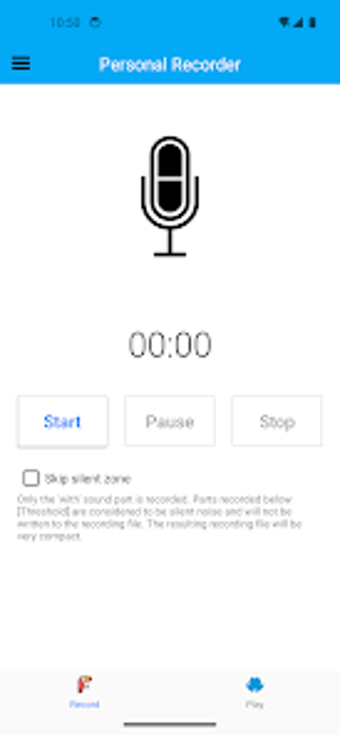
Try Personal Recorder by Life Hub Studio, a private voice companion for Android that captures personal notes and meetings on-device. The app records audio and preserves ownership by keeping files local, aimed at users who prioritise privacy and control. It presents a focused environment for daily memoing and reflection. Students, professionals, and creative users benefit from a simple workflow that emphasises device-first data management and straightforward retrieval.
On-device transcription delivers searchable text without network access
Automatic transcription runs on the device to convert voice memos into searchable text, so text copies are available without sending audio to external servers. Moreover, this on-device conversion matches a capability often handled by cloud services or premium tiers elsewhere, making quick keyword searches and text review possible for lecture notes and meeting summaries without network dependency.
One-tap capture and tags enable fast, organised recordings
Instant capture starts and stops with a single tap, and the app uses custom tags plus chronological timestamps for file organisation. In addition, tags let users group memos by topic while timestamps provide a reliable chronological index, which reduces manual sorting during later review and speeds retrieval when scanning through sessions from classes or meetings.
Minimal, ad-free interface reduces distraction during capture
Clean UI focuses on recording and retrieval by avoiding advertisements and declared tracking. In addition, the app requires no account to use, allowing immediate, anonymous access for first-time users. Nevertheless, the interface does not surface advanced editing or export wizards, so users needing detailed audio manipulation must use external tools after exporting recordings.
Offline-first design lowers external exposure but removes automatic sync
Privacy trade-off stems from an architecture that avoids cloud dependency, which reduces third-party exposure but also removes automatic cross-device syncing and online backups. Users who need multi-device access must export files manually for redundancy. The app is maintained for modern Android standards, so local operation aligns with current devices while placing backup responsibility on the user.
The app is a practical option for privacy-conscious single-device workflows
The app is a practical option for privacy-conscious users who need device-first voice capture and searchable transcripts; the main trade-off is absence of automatic cloud sync, which limits cross-device convenience. For protection, export essential recordings to external storage or schedule manual backups, and use tags consistently to simplify retrieval. The tool suits students and professionals who prefer direct control over their audio data rather than automated syncing.